No wrong cue.
No routing chaos.
Every scene lands.

ShowDeck makes audio cues reliable in live operation — with clearly labelled buttons, separate routing for main, monitor and backing track, and one click that triggers everything.

Made in Germany
One-time purchase, no subscription
Windows & macOS
Integrated:
Art-Net / DMX
MIDI
Yamaha DM3
OSC

Every stage technician knows this

Audio cues in live operation sound simple — until the real rehearsal. That's when the actual chaos begins.

Wrong cue triggered

The show is going well — until, under stress, you click the wrong button. Suddenly scene 5 plays while the stage is still in scene 3. No undo. Everyone waits. The mood is gone.

Audio routing chaos

Does the playback go to FOH? Can the actor hear the monitor? Is the backing track on the right output? With manual routing, that's a fresh guessing game before every rehearsal.

Multiple tools, no overview

VLC for the playback, a MIDI app for the sampler, a DMX program for the light — all at once on two monitors. One person slips up, everyone notices instantly.

Theatre performance with audience and dramatic stage lighting Photo via Unsplash — free to use

ShowDeck makes it
simple and reliable

Three common problems — three clear solutions right inside the software.

1

Every cue has its clear place

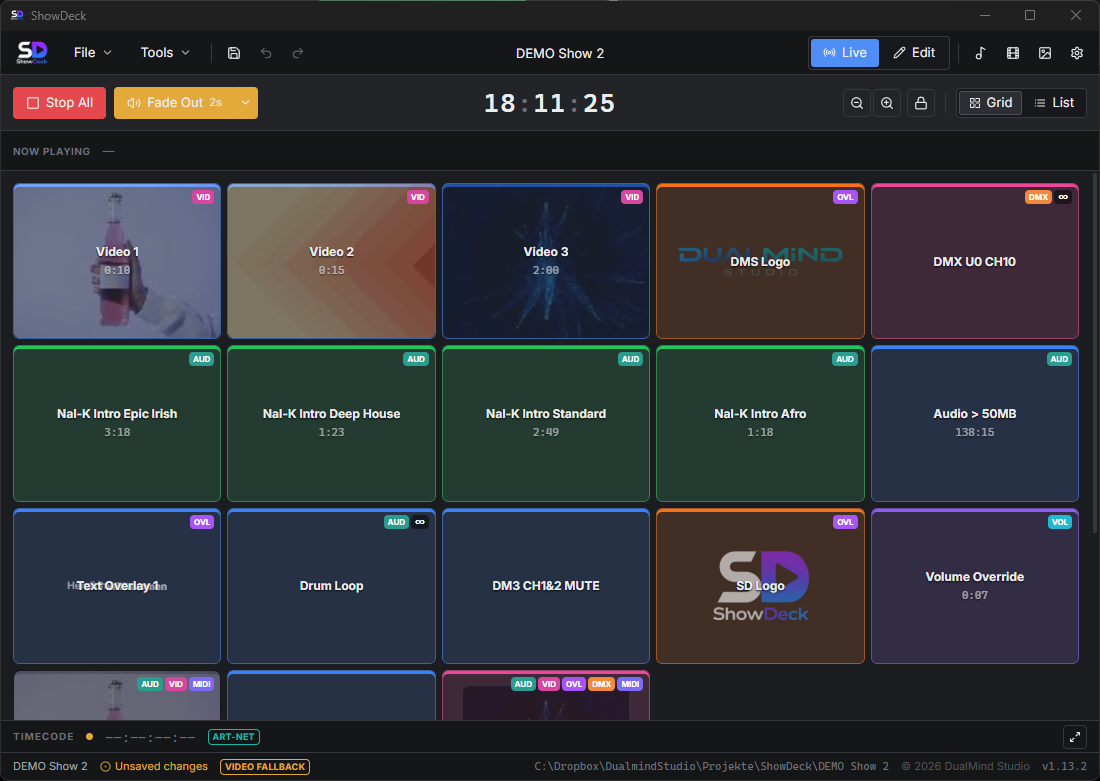
In ShowDeck every cue gets a unique name, an individual colour and optionally a hotkey. The grid view shows all cues at a glance — even under stress you immediately see what comes next. Active cues light up in colour, playback in progress is always visible.

  • Colour-coded buttons — distinguishable at a glance
  • Individual hotkeys for every cue
  • Structure cues into groups (acts / scenes)
  • Active and running cues light up visually
ShowDeck grid view with colour-coded cue buttons in live mode
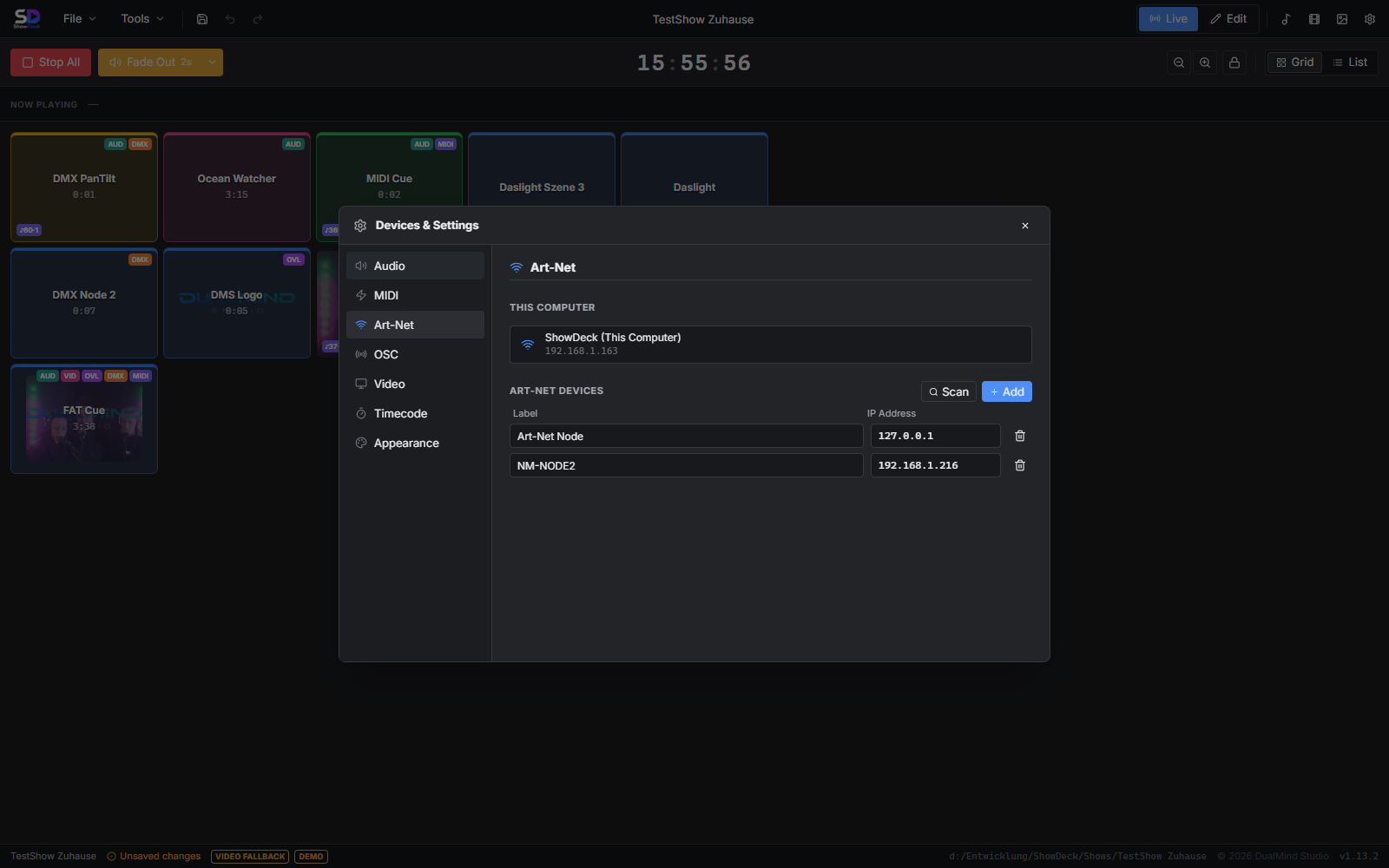
ShowDeck Device Manager: configure audio outputs and routing
2

Separate routing — set up once, never touch again

ShowDeck supports three independent audio outputs: main for the auditorium, monitor for the stage and a separate backing track bus. You configure the routing once per show — after that every audio file automatically plays on the right output.

  • 3 separate buses: main, monitor, backing track
  • Individually assignable per cue
  • Volume control per bus and per cue
  • Compatible with any multi-channel sound card
3

Audio, MIDI, light — all in one program

ShowDeck unites every control layer. A single cue can start audio, send MIDI, set a DMX scene and control the Yamaha mixer at the same time. No switching between applications, no manual coordination — one click, and the stage responds.

  • Multi-track audio simultaneously with MIDI and DMX
  • Yamaha DM3 mixer control integrated
  • Control DasLight 5 light shows in sync
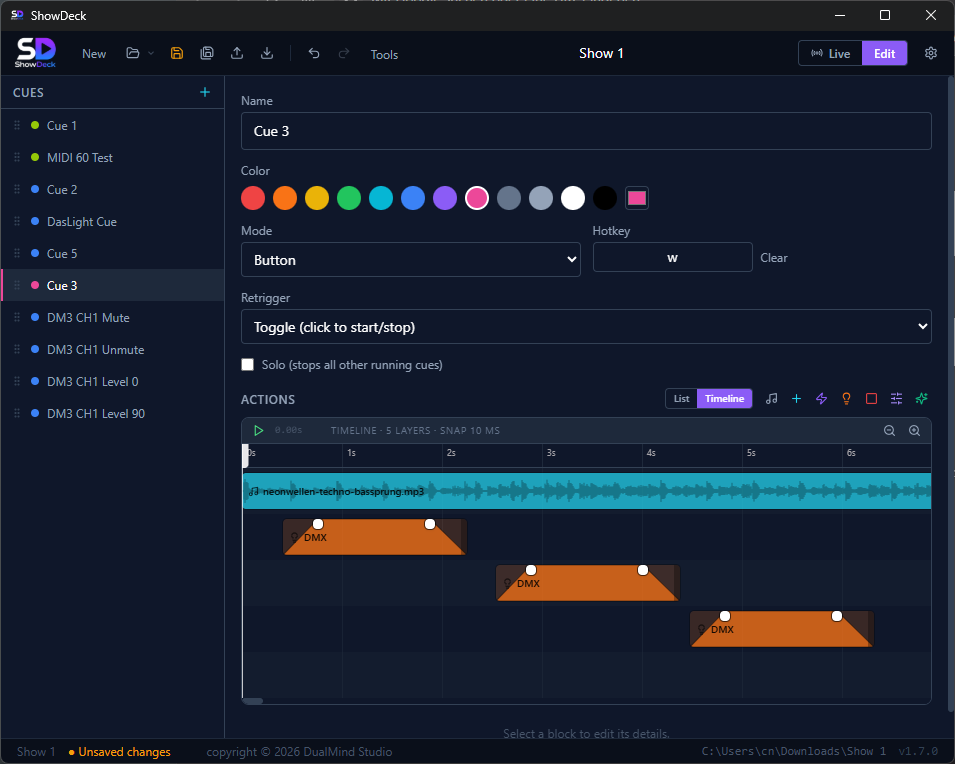
  • Timeline editor for millisecond-accurate synchronisation
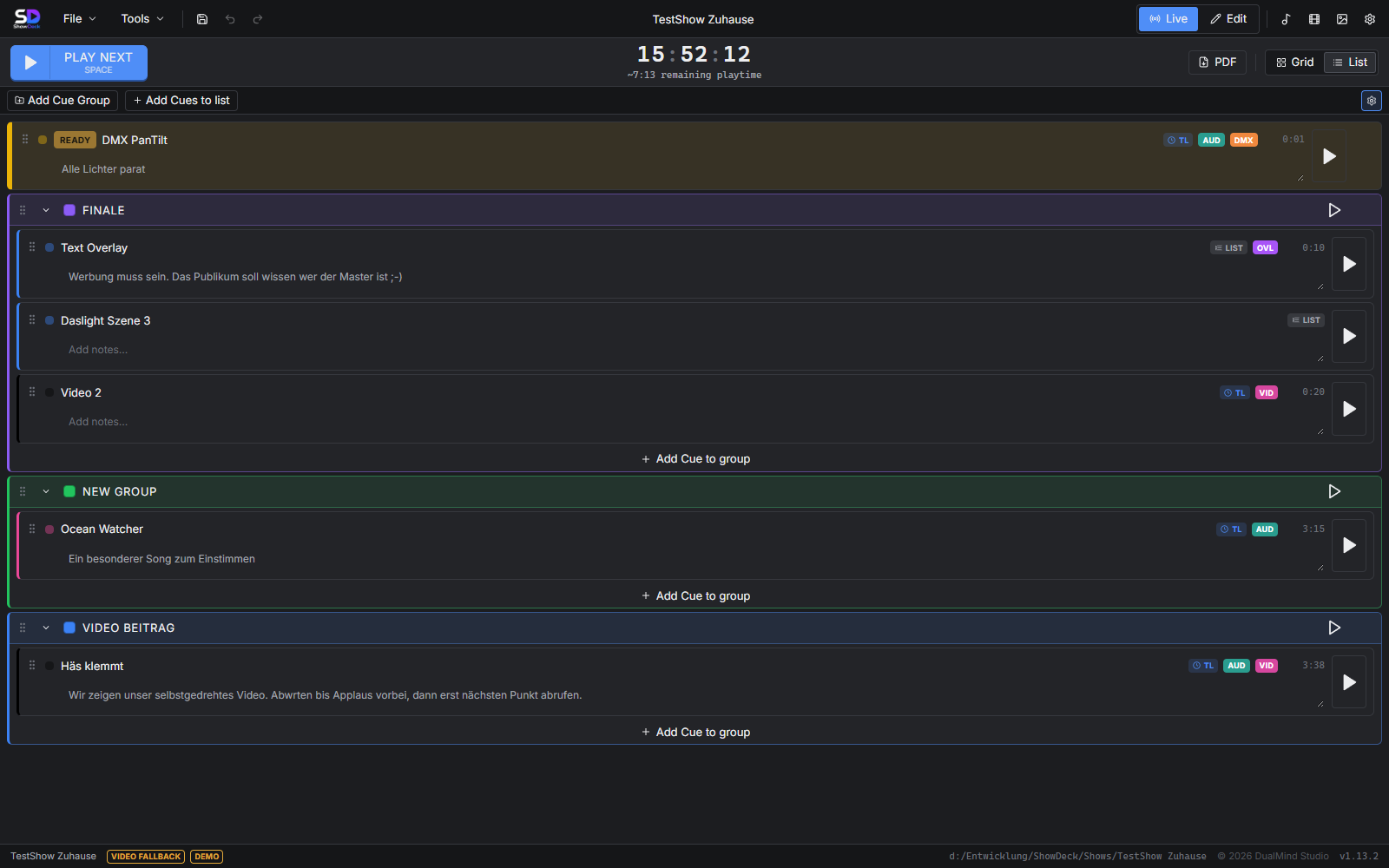
ShowDeck list view with cue groups for audio, MIDI and DMX

Everything professional
audio cueing needs

ShowDeck provides all the tools for precise, reliable audio playback — from a simple playback file to multi-track stage productions.

Multi-Track Audio

Play multiple audio files at once — per cue, without limits. Scene music, playback and atmosphere loop run in parallel on separate outputs.

3 independent outputs

Main, monitor and backing track — each bus on its own physical output. Configured once, automatically correct on every cue call.

Fade In / Fade Out

Smooth transitions instead of hard cuts. Fade duration freely configurable per audio action — from gentle fade-in to a hard cut in one millisecond.

Looping

Atmosphere, interval music, waiting sequences — cues loop seamlessly until stopped manually or replaced by another cue.

Hotkeys & quick access

Assign an individual key to every cue. Lightning-fast access without a mouse — for moments where that one second decides between applause and silence.

Acts & scenes structure

Organise all cues into groups by act, scene or category. No more long lists to search through — you navigate straight to the right scene.

Designed for real
live situations

Clear views, fast navigation — ShowDeck stays organised even in stressful moments on stage.

ShowDeck grid view: cue buttons in live mode

Large cue buttons in live mode — every cue shows type and status at a glance

ShowDeck list view: cue list ordered by acts

Cues ordered by acts and scenes — ideal for multi-act theatre productions

ShowDeck timeline: synchronise audio waveform and DMX to the millisecond

Timeline editor: align audio waveform and DMX events to the millisecond

ShowDeck Device Manager: configure audio outputs, MIDI, Art-Net and Yamaha DM3

Central device manager: audio outputs, MIDI devices, Art-Net, Yamaha DM3 and DasLight 5 in one place

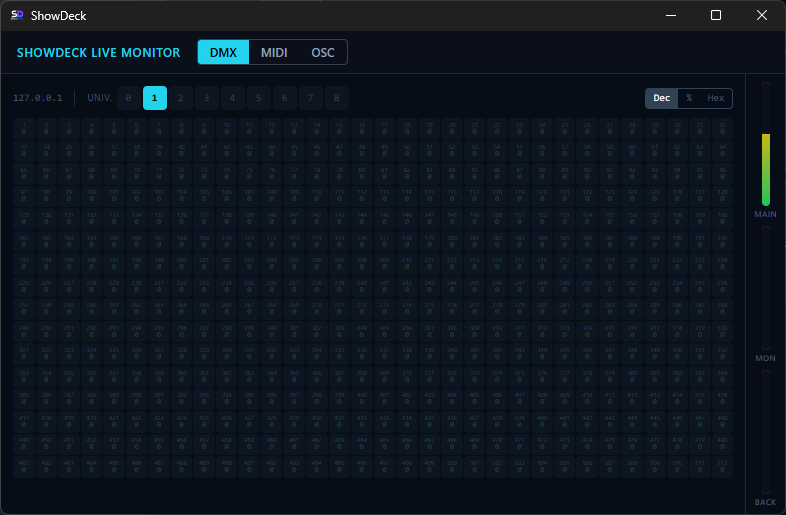
ShowDeck Live Monitor: monitor DMX, MIDI and OSC in real time

Live Monitor: track DMX channel values, MIDI signals and OSC messages in real time

From rehearsal
to premiere

1

Prepare the show

Import audio files, assign outputs, name cues and mark them with colours. Structure scenes into groups and assign hotkeys.

2

Rehearse — without surprises

In live mode all cues appear large and clear. Active cues light up, the remaining playback time is always in view — no more guesswork.

3

Premiere — one click, everything runs

Audio, MIDI and light start at the same time. Precise, reliable, every time — so you can focus on the show, not the software.

Technician at the mixing console — professional audio setup in live operation Photo via Unsplash — free to use

Buy once.
Use forever.

No subscription, no monthly costs. ShowDeck is yours — for every production to come.

Lifetime License
$149

incl. 19 % VAT — one-time payment

  • Multi-track audio with 3 separate outputs
  • Fade in/out, looping, hotkeys included
  • MIDI, Art-Net/DMX, Yamaha DM3 integrated
  • Windows 10/11 & macOS
  • No subscription, no hidden costs
Buy now — $149

Instant download after purchase — for Windows & macOS

Try it first → free download

Questions about audio cues
in ShowDeck

The key answers about audio cueing in live operation.

Which audio formats does ShowDeck support?

ShowDeck supports all common audio formats provided by the operating system — including WAV, MP3, AAC and FLAC. For professional live use we recommend uncompressed WAV files for maximum quality and minimal latency.

Can I play multiple audio files at the same time?

Yes. A single cue can start multiple audio files at once — e.g. scene music on the main output and an atmosphere loop on the monitor output. In addition, several active cues can run in parallel, so playbacks can overlap.

How does routing to main, monitor and backing track work?

In the device manager you assign each audio bus a physical output of your sound card. Then, per cue, you configure which bus the respective audio file should play on. The routing then runs fully automatically — no manual switching before or during the performance.

Can I configure fade in and fade out?

Yes. Per audio action you can specify a fade-in duration on start and a fade-out duration on stop, in milliseconds. This makes playbacks fade gently in and out — no hard cuts that destroy the atmosphere.

How do I avoid triggering the wrong cue by accident?

ShowDeck gives every cue a unique name and an individual colour — distinguishable at a glance. Active cues light up in colour. In addition, you can assign each cue an individual hotkey: lightning-fast access without a mouse, even in the dark and under stress.

Does ShowDeck work with external sound cards?

Yes. ShowDeck works with any sound card recognised by the operating system as an audio output device — including professional multi-channel interfaces for separate FOH and monitor outputs. Typical stage interfaces such as Focusrite or MOTU work without issues.

Is there a user manual?

Yes. The complete user manual explains every function in detail — from setting up the audio devices and creating cues to live operation. To the user manual →