All cues.
One click.
Show control for live events.

ShowDeck controls audio, light, MIDI and mixer in perfect sync — reliable, responsive, professional. For event technicians, theatre and corporate events.

Made in Germany
One-time purchase, no subscription
Windows & macOS
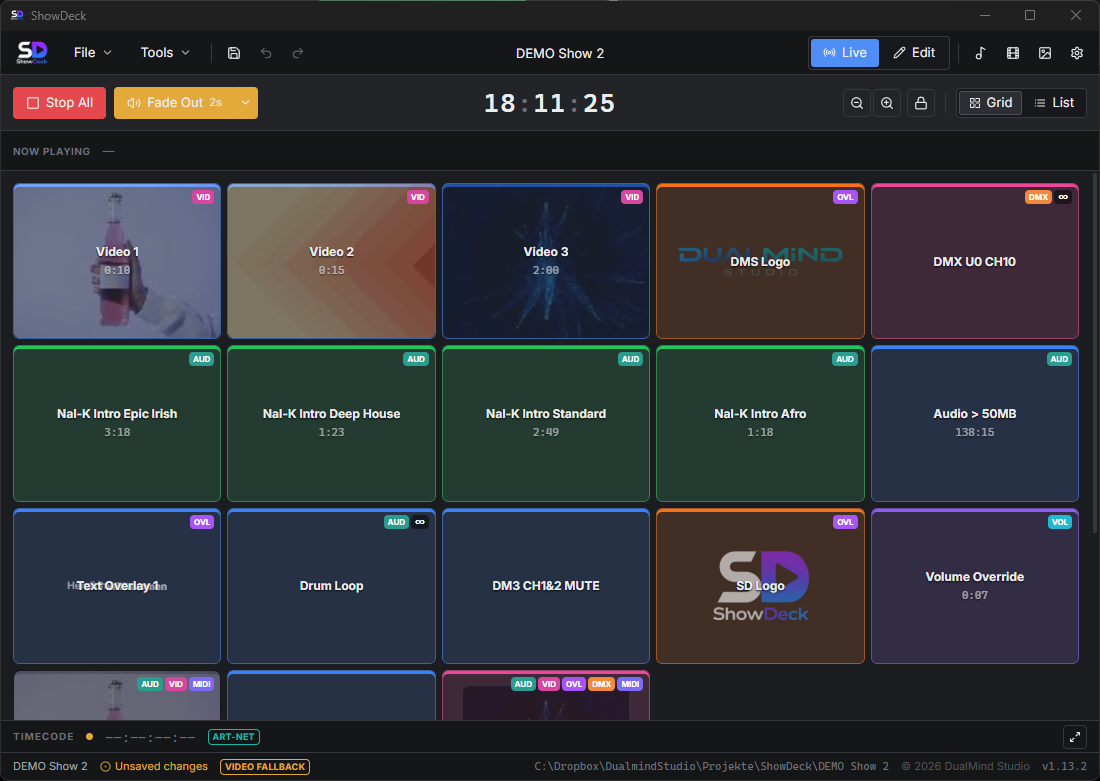
ShowDeck grid view
Integrated:
Art-Net / DMX
MIDI
Yamaha DM3
OSC
Timecode (LTC / MTC / Art-Net)

Everything a professional
show needs

From audio to light, from MIDI to mixer — ShowDeck unites every control layer in one single, reliable tool.

Multi-Track Audio

Play multiple audio files at once — with separate outputs for main, monitor and backing track. Fade in/out, looping and precise volume control included.

DMX & Light Control

Control stage lights directly via Art-Net — no extra hardware needed. Channel values, smooth crossfades and scenes at the push of a button, in sync with the rest of the show.

MIDI Control

Send MIDI signals to every connected device. Ideal for samplers, synthesizers, effects units or any other MIDI-capable stage gear.

Yamaha DM3 Integration

Control mixer channels straight from ShowDeck — mute, unmute, set levels. No manual intervention at the console, everything runs automatically within the cue.

OSC Integration

Control a wide range of applications via OSC — such as lighting software like DasLight 5. In reverse, ShowDeck receives OSC messages and uses them as triggers for your cues.

Hotkeys

Assign an individual key to every cue. Lightning-fast access from the keyboard — ideal for situations where every second counts.

Timecode Input

ShowDeck receives incoming timecode signals — LTC, MTC and Art-Net. Your show runs in lockstep with the other systems in your production.

From preparation
to applause

1

Build the show

Create cues, assign audio files and light scenes, configure MIDI actions, connect devices. Everything in one place, clearly structured.

2

Go live

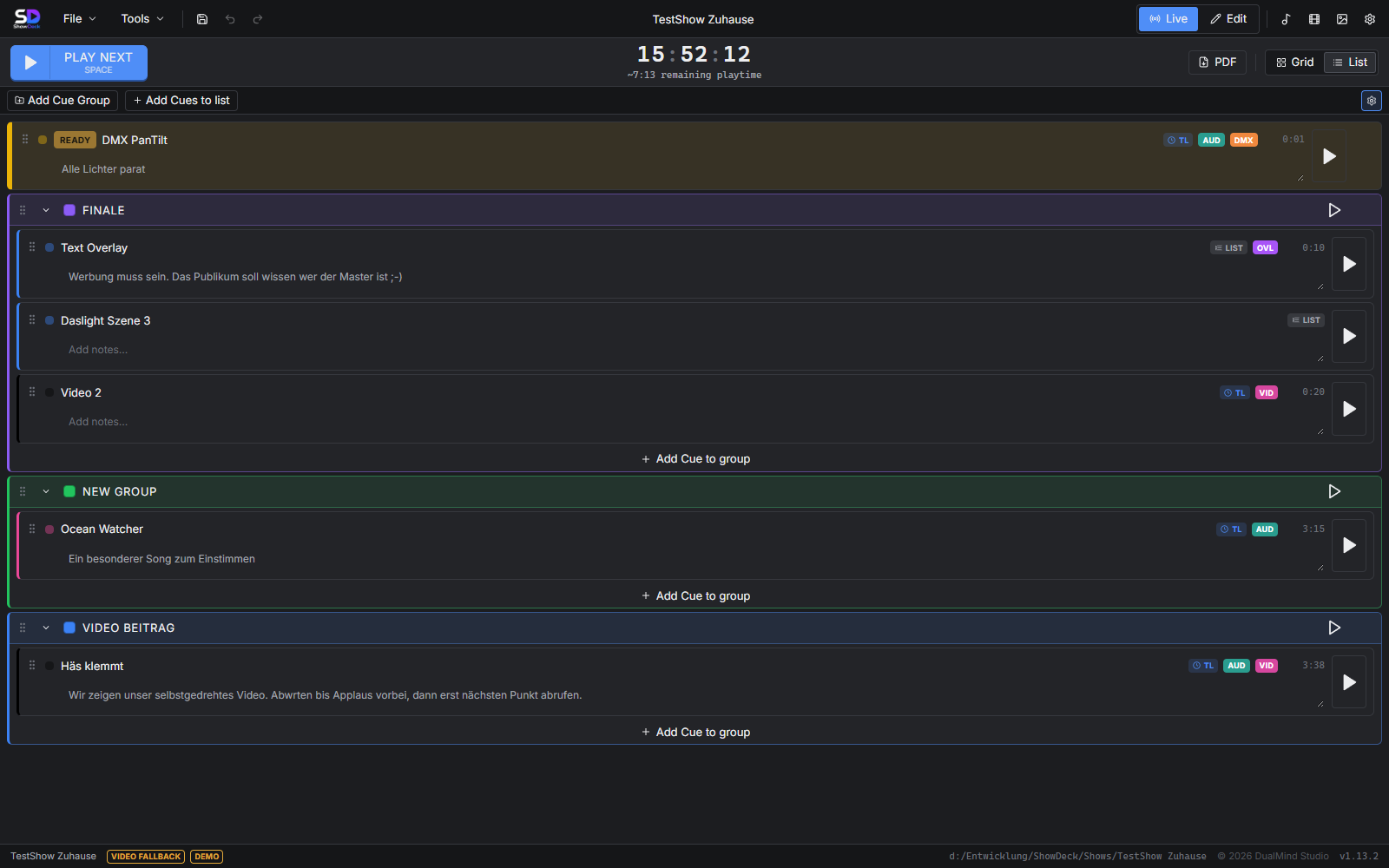
In live mode the large button grid or the clear cue list is ready. Active cues light up, the remaining playback time is always visible.

3

Show what you can do

One click triggers everything at once — audio, light, MIDI, mixer. Precise, reliable, every time. So you can focus on the show.

For everyone who controls
live shows professionally

ShowDeck adapts to your workflow — whether theatre, event technology or corporate event.

Theatre & Stage

Control cue lists, scene transitions and light and sound scenes in sync. No more manual intervention — every cue lands perfectly, every performance reproducible.

Event Technology

Coordinate technical sequences, DMX control, MIDI triggers and audio playback centrally. Reliable even under time pressure — because mistakes are not an option.

Corporate Events & Agencies

Run productions and stage shows professionally. Reproducible workflows that work at every event — even when you work with changing teams.

Dive deeper into the topics

Two common requirements — two detailed overview pages with all the details, solutions and questions.

Designed for use
under real conditions

Clear views, fast navigation — ShowDeck stays organised even in stressful live situations.

ShowDeck grid view: cue buttons in live mode

Large cue buttons in live mode — every cue shows its type (audio, MIDI, DMX) at a glance

ShowDeck list view: cue list with groups

Organise cues into groups — ideal for shows with multiple acts or sections

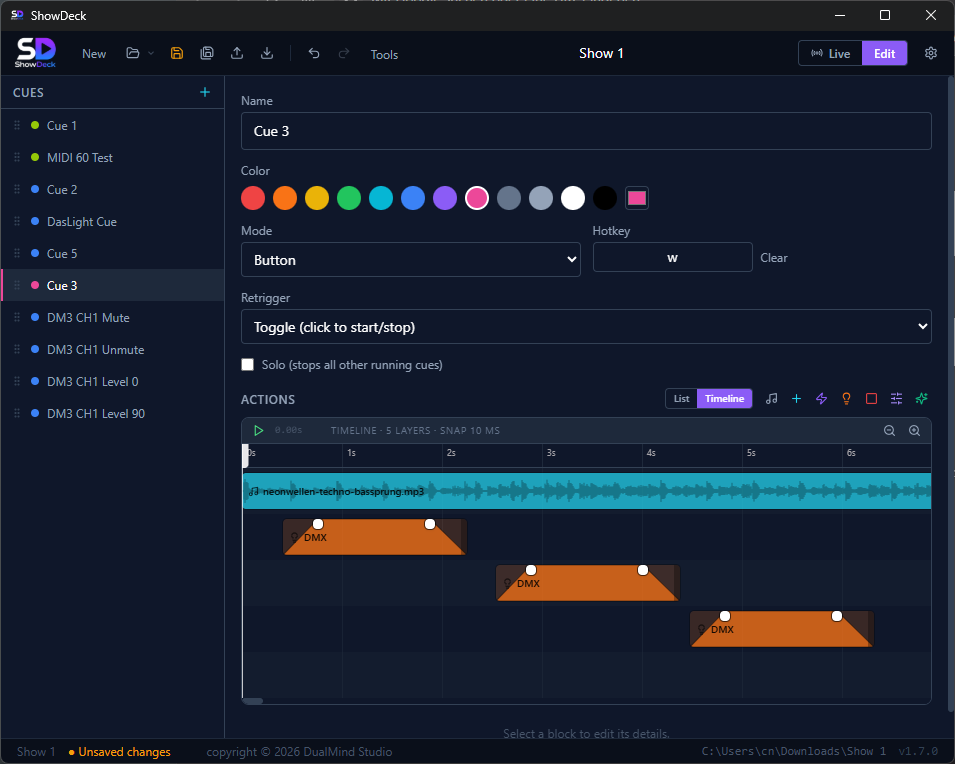
ShowDeck timeline: align audio and DMX over time

Timeline editor: align audio waveform and DMX events to the millisecond

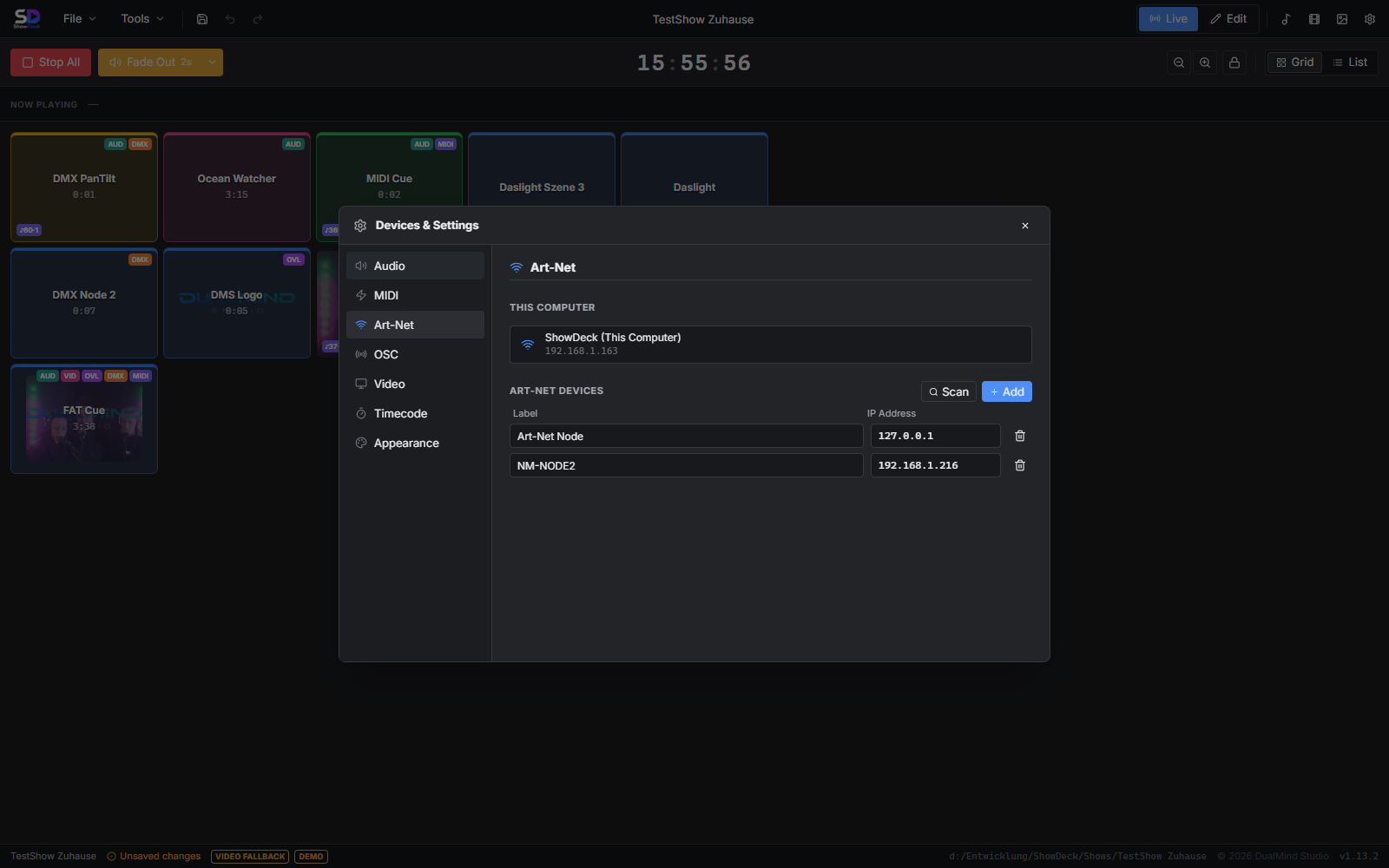
ShowDeck Device Manager: audio, MIDI, Art-Net, Yamaha DM3, DasLight 5

Central device manager: configure audio outputs, MIDI devices, Art-Net, Yamaha DM3 and DasLight 5 in one place

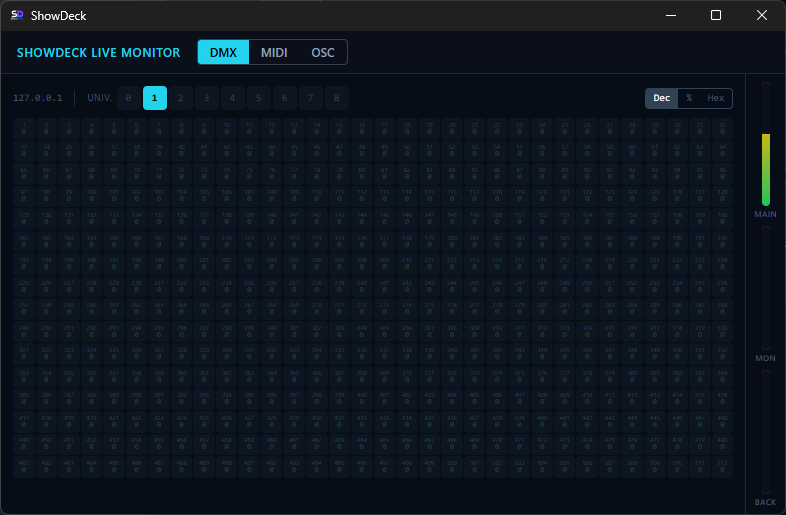
ShowDeck Live Monitor: monitor DMX, MIDI, OSC in real time

Live Monitor: track DMX channel values, MIDI signals and OSC messages in real time — essential during setup and for troubleshooting

Buy once.
Use forever.

No subscription, no monthly costs. ShowDeck is yours — for every show to come.

Lifetime License
$149

incl. regional VAT — one-time payment

  • Windows 10/11 & macOS
  • All current features included
  • Major updates at half price
  • For unlimited shows and projects
  • No subscription, no hidden costs
Buy now

Instant download after purchase — for Windows & macOS

Try it first → free download

Frequently asked questions

Everything you want to know before buying.

What is ShowDeck?

ShowDeck is show control software for Windows and macOS. It lets you control audio, light (via Art-Net/DMX), MIDI and Yamaha mixer channels in a single cue. One click triggers all assigned actions simultaneously — ideal for professional live events, theatre and corporate events.

Who is ShowDeck for?

ShowDeck is aimed at event technicians, theatre technology teams and event agencies who need to control live shows professionally and reliably. The software suits anyone who wants to synchronise multiple devices (audio, light, MIDI, mixer) at the push of a button.

Which devices and protocols does ShowDeck support?

ShowDeck supports Art-Net and DMX for light control, MIDI for device control, the Yamaha DM3 mixer and DasLight 5 for light shows. ShowDeck can also receive incoming timecode signals (LTC, MTC and Art-Net). Multi-track audio with separate outputs for main, monitor and backing track is also integrated.

Is ShowDeck a subscription or a one-time purchase?

ShowDeck is a one-time purchase for $149 (incl. regional VAT). There is no monthly subscription and no hidden costs. Major updates are available at half price. After purchase the download is available immediately for Windows and macOS.

Which operating systems does ShowDeck run on?

ShowDeck runs on Windows 10, Windows 11 and macOS. After purchase the download is available immediately for both platforms.

What is a cue in ShowDeck?

A cue is a saved sequence step in ShowDeck. With a single click or key press, all assigned actions run at the same time: audio starts, light scenes change, MIDI signals are sent and mixer channels are set. Cues can be organised into groups and called up via hotkey.

Is there a user manual?

Yes. The complete user manual explains every function in detail — from setting up devices and creating cues to live operation. To the user manual →

Where can I find other users?

Connect with other ShowDeck users in our Facebook User Group — ask questions, share your setups and stay up to date with the latest news. To the Facebook User Group →

Questions about ShowDeck?
We're happy to help.

For technical questions, licensing enquiries or feedback — just write to us. We reply as quickly as possible.

Your data is used exclusively to answer your enquiry and is not shared with third parties.